Applications involved:
• ISA Server 2004
• Windows 7 on client side {As I have done it on windows 7}
• Excel 2007
• ISA2XLSV2.hta {Use to read rules from xml file}
Procedure:
Step # 1: Move on to Server Machine on which ISA Server 2004 is installed
Step # 2: Now open ISA Server Management Console
Step # 3: Expend the server
Step # 4: Select Firewall policy
Step # 5: Right click on “Firewall policy” and select Export
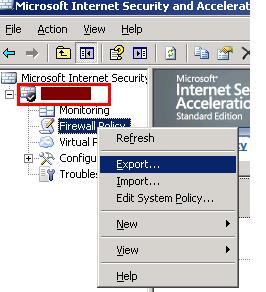
Step # 6: Now save the file on your desired place. This will export all the group policies into an xml file.
Step # 7: Here we require tool named ISAInfo2XLS.hta which can be downloaded from Here
Step # 8: Now import your xml file in this tool
Step # 9: Expend “Firewall Policy” tab and click on “Array Rules”
Step # 10: Copy all the data from right pane and past it into a text file.
Step # 11: Now open ms excel and press open select file type to “All Files” and now locate your text file press ok
Step # 12: It will run automatically run “Text Import Wizard” from here select “Delimited” and press next

Step # 13: On this screen select others and type a pipe sign from keyboard “ | ” looks like this and press next

Step # 14: On next screen just press “Finish”. It will generate your desired file.
Step # 15: Now you have to format it a bit as per your requirement.
So there you go. Now you have all firewall policies in excel format {You can do the same for all kind of ISA server policies like system policies etc}. Hope you all find it useful for documenting the firewall or other ISA server policies.

